The API uses Bearer (Token) Authentication to authenticate requests. The value of this bearer token is a JSON Web Token (JWT), which is passed in the Authorization HTTP header and signed by a private API Key.
curl -X GET https://api.example.gr4vy.app/transactions \
  -H "authorization: bearer eyJhbGciOiJIUzI1NiIsInR5cCI6IkpXVCJ9.eyJzdWIi..."

Create a new API key

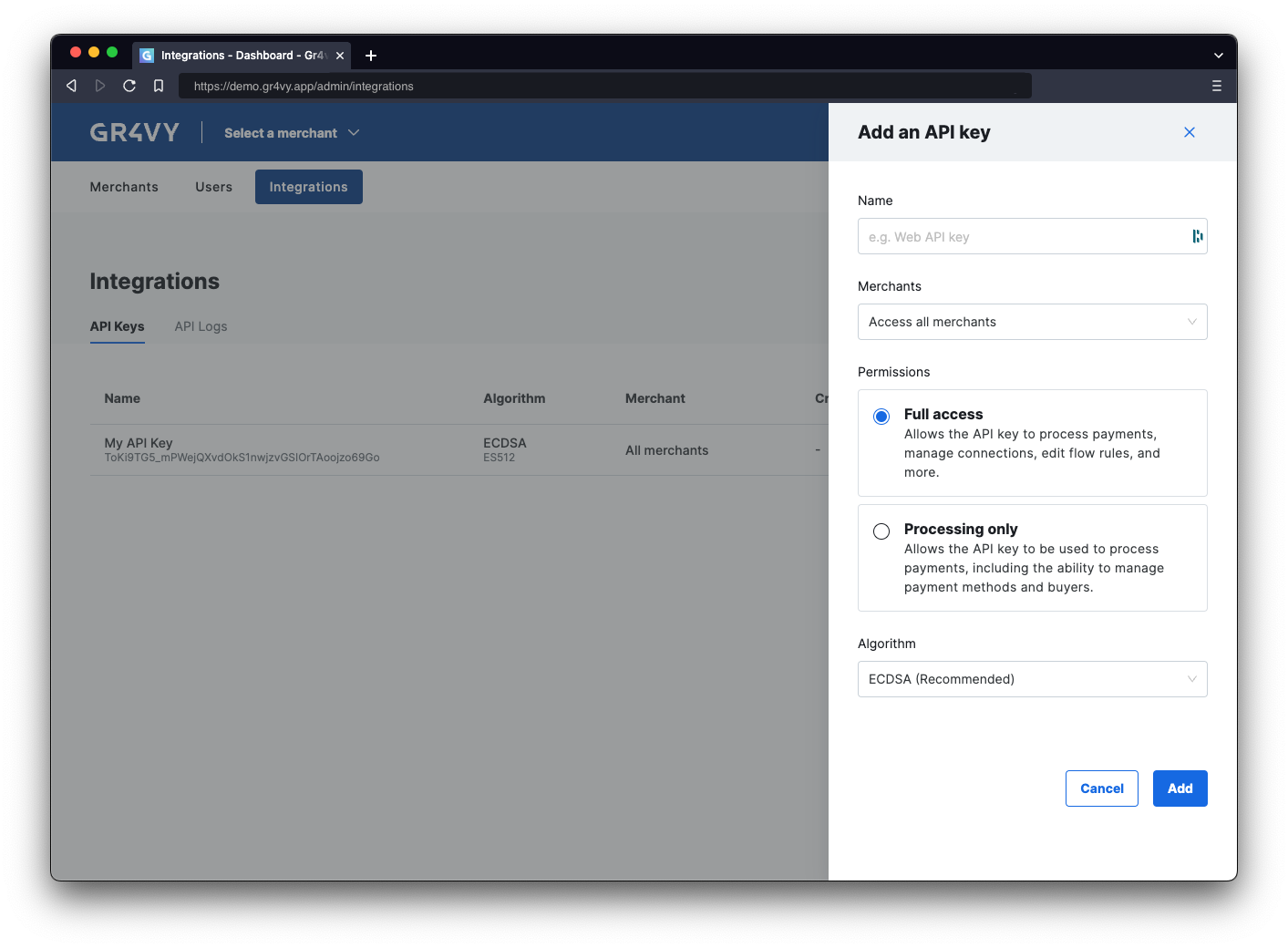
To use the API, generate a new API key. Head over to the dashboard and visit the Integrations page. API key dashboard On this page, select the Add API key button and select a name for the key. The name is purely to track what key is for what integration. The downloaded key needs to be stored securely as it is not stored by the system.
Using an SDK is the most simple way to call and authenticate with the API. When using one of the SDKs to call the API, authentication is handled by the SDK client. Simply initialize the SDK with the private key to handle authentication.

Install a server-side SDK

Use the package manager in the preferred programming language to install the server-side SDK. Token generation can only be done server side and doing this client side is not recommended as it exposes the API key to customers.
dotnet add package Gr4vy
go get github.com/gr4vy/gr4vy-go
# Please check for the latest version
implementation 'com.gr4vy:sdk:1.0.0'
composer require "gr4vy/gr4vy-php"
pip install gr4vy
npm install @gr4vy/sdk
# or: yarn add @gr4vy/sdk
Please always check and install the latest release of the preferred SDK.

Initialize the SDK client

Next, initialize the SDK with the ID of the instance and the private key.
using Gr4vy;
using Gr4vy.Models.Components;
using System.Collections.Generic;

// Loaded the key from a file, env variable, 
// or anywhere else
var privateKey = "..."; 

var sdk = new Gr4vySDK(
    id: "example",
    server: SDKConfig.Server.Sandbox,
    bearerAuthSource: Auth.WithToken(privateKey),
    merchantAccountId: "default"
);
package main

import (
	"context"
	gr4vy "github.com/gr4vy/gr4vy-go"
	"github.com/gr4vy/gr4vy-go/models/operations"
	"log"
	"os"
)

func main() {
	ctx := context.Background()

	privateKey := "...." // Private key loaded from disk or env var
	withToken := gr4vy.WithToken(privateKey, []JWTScope{ReadAll, WriteAll}, 60)

	s := gr4vy.New(
		gr4vy.WithID("example"),
		gr4vy.WithServer(gr4vy.ServerSandbox),
		gr4vy.WithSecuritySource(withToken),
		gr4vy.WithMerchantAccountID("default"),
	)
}
package hello.world;

import com.gr4vy.sdk.BearerSecuritySource;
import com.gr4vy.sdk.Gr4vy;
import com.gr4vy.sdk.Gr4vy.AvailableServers;
import com.gr4vy.sdk.models.components.AccountUpdaterJobCreate;
import com.gr4vy.sdk.models.errors.*;
import com.gr4vy.sdk.models.operations.ListTransactionsRequest;
import java.lang.Exception;
import java.util.List;

public class Application {

    public static void main(String[] args) throws Exception {

        String privateKey = "-----BEGIN PRIVATE KEY-----\n...."; // a valid private key

        Gr4vy sdk = Gr4vy.builder()
                .id("example")
                .server(AvailableServers.SANDBOX)
                .merchantAccountId("default")
                .securitySource(new BearerSecuritySource.Builder(privateKey).build())
            .build();
    }
}
declare(strict_types=1);

require 'vendor/autoload.php';

use Gr4vy;
use Gr4vy\Auth;

// Loaded the key from a file, env variable, 
// or anywhere else
$privateKey = "..."; 

$sdk = Gr4vy\SDK::builder()
    ->setId('example')
    ->setServer('sandbox')
    ->setSecuritySource(Auth::withToken($privateKey))
    ->setMerchantAccountId('default')
    ->build();
from gr4vy import Gr4vy, auth
import os

client = Gr4vy(
    id="example",
    server="production",
    merchant_account_id="default",
    bearer_auth=auth.with_token(open("./private_key.pem").read())
)
import fs from "fs";
import { Gr4vy, withToken } from "@gr4vy/sdk";

const gr4vy = new Gr4vy({
    server: "sandbox",
    id: "example",
    bearerAuth: withToken({
      privateKey: fs.readFileSync("private_key.pem", "utf8"),
    }),
});
The instance ID is the unique identifier for the deployment of the system and is included in every API call. Together with the environment (sandbox or production) it is used to connect to the right APIs, as well as dashboard.

Summary

In this step you:
  • Learned about API authentication
  • Created a new private key for the API
  • Used an SDK to authenticate or manually created a token